Checked by realLaw AI
Electronic Invoicing (E-invoicing) in the UAE
A Brief Overview of the Legislation from realLaw AI
Key Questions
What Is E-Invoicing in the UAE
An electronic invoice is not a PDF, but a data file in XML format. Your system transmits it to your ASP; the ASP verifies it and delivers it to the buyer’s ASP via the international Peppol network; and both ASPs transmit the invoice data to the FTA. It is the XML file that constitutes the legally valid tax invoice; the PDF is merely a readable copy.
The UAE model is called DCTCE (Decentralized Continuous Transaction Control and Exchange) or the “five-corner model”:
1. Corner 1 — Supplier. The supplier’s ERP, billing system, or ASP portal generates the invoice data.
2. Corner 2 — the supplier’s ASP. It validates the data against the PINT AE standard, assigns a UUID, and sends the document via the Peppol network.
3. Corner 3 — the buyer’s ASP. It receives the document and delivers it to the buyer.
4. Corner 4 — the buyer. Processes the XML in its system.
5. Corner 5 — FTA. Receives data for each document from both ASPs: the supply report and the receipt report.
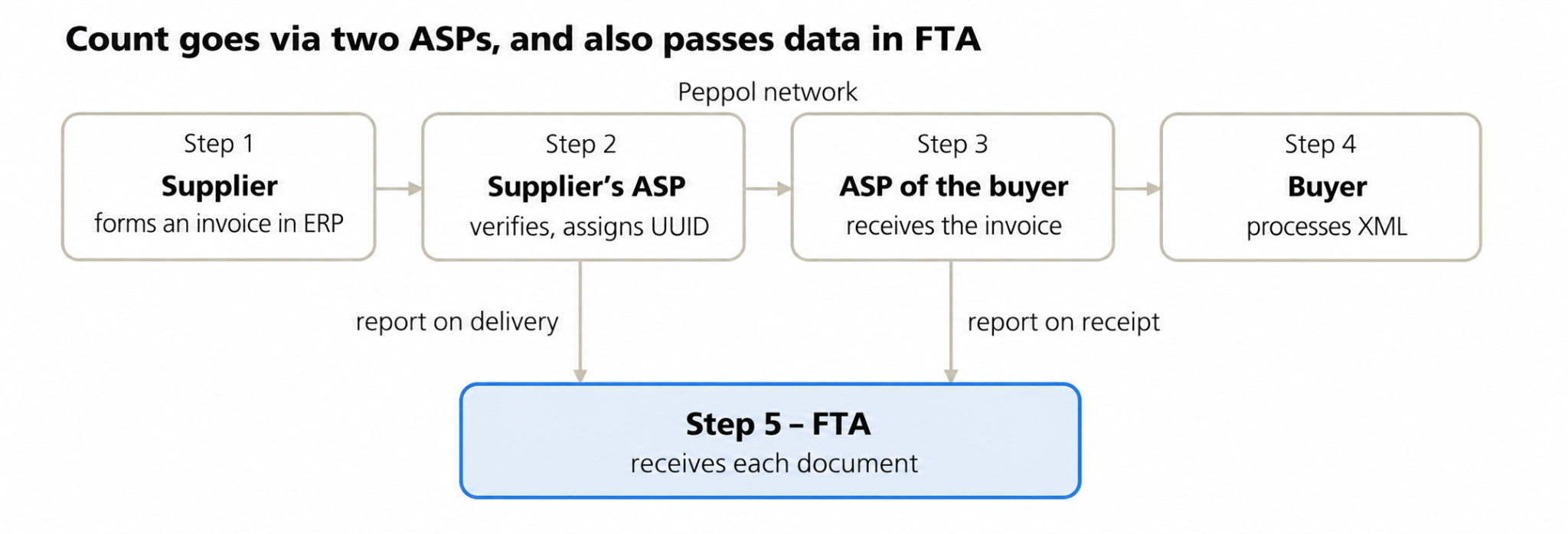
Five-corner model · Invoice flow and reporting in FTA
The invoice flows from left to right through the two ASPs, and the FTA receives data directly from both parties—so discrepancies between the supplier and the buyer are immediately apparent.
What this means in practice:
• No one other than the ASPs connects directly to the FTA. There is no government portal for issuing invoices, as in Saudi Arabia or India.
• This is not a pre-approval (clearance) model. The FTA does not approve the invoice before it is sent, and the buyer does not “accept” it. An invoice that has been verified by the ASP and delivered is considered issued.
• Invoices cannot be rejected within the system. Errors can only be corrected via a supplier credit note.
• Each document has a UUID assigned by the ASP. The invoice number remains the supplier’s internal number. A QR code is not required.
• The FTA sees transactions in near real time from both sides. Discrepancies between invoices and the VAT return are visible before the return is filed.
Timelines and Stages
|
Who |
Appoint an ASP by |
Switch to e-invoicing |
|
Pilot and Voluntary Transition |
— |
Effective July 1, 2026 |
|
Revenue of AED 50 million or more |
October 30, 2026 |
January 1, 2027 |
|
Revenue less than AED 50 million |
March 31, 2027 |
July 1, 2027 |
|
Government agencies |
March 31, 2027 |
October 1, 2027 |
|
Transactions within the VAT group |
— |
24-month deferral starting January 1, 2027, i.e., until the end of 2028 |
Source: MD 244/2025, as amended by MD 66/2026, Articles 3–5; deadline for VAT groups—MD 243/2025, Article 4(1)(f).
How to Calculate the AED 50 million Threshold
• Revenue — gross revenue for the most recent reporting period as shown in the financial statements. If financial statements are not available, other documents acceptable to the FTA may be used. This is not the turnover subject to VAT.
• The period is not tied to the calendar year. If the fiscal year coincides with the calendar year, it is typically the year ending December 31, 2025.
• Scope—each legal entity is assessed separately based on its own financial statements, rather than as part of a group. Companies within the same group may be at different stages of the process.
• Composition—all revenue reported in the financial statements, including B2C, exports, and interest income.
New Companies
According to Guidelines V 2.0 (paragraph 8.4), a company established within the scope must appoint an ASP and complete the onboarding process before issuing its first invoice, regardless of its date of establishment; all of its invoices must be e-invoices. The Guidelines do not explicitly state how this relates to the MD 244 stages for companies established before July 1, 2027—this should be clarified with the FTA.
The 2027 Transition Period
From January through June 2027, it will be common for a supplier to already be connected while the buyer is not yet connected:
• The Phase 1 supplier sends the XML invoice to the service address 0235:9900000098—the data is transmitted to the FTA;
• At the same time, the buyer receives a standard invoice in PDF or on paper—this is needed for VAT deduction and tracking accounts receivable;
• Until July 1, 2027, the second-stage supplier issues standard invoices, and the first-stage buyer cannot refuse to accept them;
• Starting July 1, 2027, a PDF from a supplier within the system will no longer replace an e-invoice. The exception is government agencies until October 1, 2027.
Scope of Obligated Parties
Who Is Required to Comply
• Companies registered for VAT—must issue tax invoices in the form of e-invoices.
• Companies not registered for VAT (for example, those registered only for corporate income tax) — register using their TIN and issue commercial invoices (480).
• Freelancers and sole proprietors (sole establishment) providing services to companies fall under B2B. If they do not have a TIN, they must first obtain one through EmaraTax.
• Non-residents registered for VAT in the UAE issue tax invoices in the form of e-invoices.
• Recipients. The buyer also has obligations: they process incoming e-invoices through the system, which means they must also designate an ASP. This applies even to companies whose sales are entirely exempt but who have suppliers in the UAE.
• The counterparty’s status is irrelevant. Whether the buyer is connected to the system or registered for tax purposes does not affect the supplier’s obligations (Guidelines V 2.0, paragraph 6.1).
• Investment holding companies. A holding company that generates only passive income and has no business transactions is outside the scope. However, the reallocation of expenses (e.g., administrative expenses) constitutes a business transaction, and in that case, the holding company must be connected according to the general schedule (Guidelines V.2.0, paragraph 6.3.1).
• A safety net. An entity that works exclusively with individuals (B2C) is not subject to the system (MD 244, Art. 5(2)). However, if it has business suppliers in the UAE, an ASP is still advisable for receiving their invoices and safeguarding VAT deductions.
Regulatory Authorities
The UAE Ministry of Finance (MoF) develops the rules governing the operation of the e-invoicing system and publishes technical documents, including the UAE E-Invoicing Guidelines, Mandatory Fields and PINT AE. The Federal Tax Authority (FTA) receives information about submitted invoices from the supplier’s ASP and the recipient’s ASP, and administers the system’s requirements and related tax obligations. Accredited Service Providers (ASPs) are not government agencies but mandatory participants in the infrastructure: they verify and transmit invoices via Peppol, report to the FTA, and ensure the receipt of documents.
Accreditation, Selection, and Connection of ASPs
Requirements for ASPs under MD 168/2026
• An active, certified Peppol provider that has passed OpenPeppol tests.
• The product has been in operation for at least two years (a third-party product is acceptable).
• Paid-in capital of at least AED 50,000, audited financial statements, and ISO 22301 and ISO 27001 certifications.
• Insurance: professional liability coverage of at least AED 2.5 million; coverage for crime and cyber fraud of AED 5 million each.
• 100 free exchange and reporting transactions per year for each client—an ASP commitment specified in the accreditation declaration.
• Accreditation is valid for two years. If an ASP fails to renew it on time, the accreditation will be revoked and all client relationships will be terminated. Upon termination of accreditation, the ASP must notify clients within 5 business days.
• Providers with preliminary approval under the old MD 64/2025 must comply with the new requirements within 30 days starting October 1, 2026; otherwise, their approval will be revoked.
How to Choose
1. Create a shortlist of 3–5 providers from the official list on the Ministry of Finance and FTA websites. Check the accreditation expiration date.
2. Request a demonstration of the portal and its integration with your ERP—this is where the main issues tend to surface.
3. Evaluate providers based on the criteria (below) and compare prices on an equal footing.
4. Finalize the contract.
5. Complete the setup in EmaraTax and obtain a Peppol ID.
|
Criterion |
What to Check |
|
Integration |
A ready-to-use connector to your ERP or a documented API with a test environment; does the ASP accept your data and convert it to PINT AE on its own? |
|
Validation |
Full validation via PINT AE with clear error messages |
|
Inbound |
Receipt and delivery of incoming invoices to the ERP; transfer of optional fields (POs, SKUs, attachments) |
|
Statuses |
UUID and FTA status are returned to the ERP via API or webhooks |
|
Reliability |
Availability SLA, incident notifications, support |
|
Data |
Archive for retention period, export, security, storage location |
|
Experience |
Scenarios for your industry: free zones, exports, continuous supplies, credit notes |
|
Pricing |
Setup, subscription, or per-document pricing; incoming documents, archiving, and support—based on your annual volume. FTA does not regulate rates |
What to Include in the Contract
• Availability levels, incident response times, and compensation;
• Data rights remain with the customer; the ability to export the archive and switch to another ASP without data loss;
• Notification of accreditation renewal and termination, migration plan;
• 100 free transactions per year;
• procedures for handling system failures, logs, and assistance with FTA relations;
• Allocation of liability for validation errors and transmission delays. The FTA will impose a penalty on the company, and compensation from the ASP is possible only under the terms of the contract.
Setup in EmaraTax
1. Select an ASP from the list and sign a contract.
2. The company’s account administrator logs into EmaraTax and selects the E-INVOICING tile.
3. Select an ASP and click “Proceed to ASP.”
4. On the ASP portal, the verification, account setup, and technical connection are completed.
5. The ASP provides the company’s Peppol ID.
If there is no TIN, it must first be obtained through EmaraTax. After any change to the company’s data in the FTA (name, address, etc.), the ASP must be notified in writing within 5 business days after the FTA confirms the change (MD 243, Art. 5(3)). A change of name does not alter the TIN and does not prevent the assignment of an ASP.
Before connecting, verify that the company’s information in EmaraTax is up to date: license, address, and contact details. Subsequent changes—such as VAT registration or deregistration, joining or leaving a VAT group, or closing the business—are reflected through re-verification or offboarding in EmaraTax (Guidelines V 2.0, paragraphs 13.5 and 15.3).
Changing ASPs and the Role of Partners
• You can change ASPs as often as needed by deactivating the old provider (offboarding) and activating a new one in EmaraTax. A legal entity may have only one ASP at a time
• The Peppol ID is linked to the TIN and is transferred to the new provider. Plan the transition in advance to ensure seamless service and access to the archive.
• An implementation partner can integrate an ERP system with an ASP but cannot replace the ASP unless the partner is accredited itself.
Legal Framework
The system is regulated at four levels: Federal Decree-Law No. 8 of 2017 On Value-Added Tax and its Implementing Regulations (Cabinet Decision No. 52 of 2017); Ministerial Decision No. 243 of 2025 (rules and exemptions) and Ministerial Decision No. 244 of 2025 (deadlines); Cabinet Decision No. 173 of 2026 (penalties); and technical guidelines from the Ministry of Finance. The legal force of regulatory acts and methodological specifications varies. The current versions and status of each document are listed at the end of this overview.
Transactions Within the Scope and Exceptions
Excluded Transactions (MD 243, Art. 4)
|
Exclusion |
Conditions and Limits |
|
Transactions by Government Agencies Acting in Their Sovereign Capacity |
Only if they do not compete with the private sector |
|
International passenger transportation by an airline |
Only by the airline itself and only when issuing an electronic ticket |
|
Airline ancillary services for passengers |
Upon issuance of an EMD (Electronic Miscellaneous Document) |
|
International cargo transportation by an airline |
Upon issuance of an airway bill; only 24 months from the system’s launch |
|
Financial services exempt from VAT or subject to a 0% rate under Article 42 of the Implementing Regulation |
For example, interest on loans. Services provided for an explicit commission or fee remain within the scope. Exempt financial services provided to non-residents, which are taxed at a 0% rate as exports under Article 31 of the Executive Regulations, are also excluded. Services that would be provided to a resident at the standard rate remain within the scope even at a zero export rate (Guidelines V 2.0, paragraph 7.3) |
|
Transactions between members of the same VAT group |
24 months starting January 1, 2027. Each member must still connect to the ASP. This is a deferral, not an exclusion from the scope: upon its expiration, the rules apply in full (paragraph 6.3.2) |
|
Other transactions as determined by the Minister |
As of the date of this review, no such decisions have been made |
What does not require an e-invoice because it is not a supply or is not from our supplier
• Imports of goods and services from foreign suppliers. Their invoices are received as before, and VAT is accounted for using the reverse charge mechanism.
• Dividends, fines, deposits, and intra-group cash transfers—these do not constitute a supply.
• True disbursements—expenses paid on behalf of a client and re-invoiced without a markup, provided the conditions of Article 33 of the VAT Implementing Regulations are met. Re-invoicing of expenses (recharges) constitutes a supply and falls within the scope of the regulation.
• Pro forma invoices, commercial offers, reconciliation statements, and payment requests are not invoices. However, if payment is received based on them, an e-invoice is required for the amount received.
• Transactions conducted entirely outside the UAE between non-residents who do not conduct business in the UAE.
Types of Electronic Documents and Codes
Document Types
|
Code |
Document |
When to Use |
|
380 |
Tax Invoice (Electronic Tax Invoice) |
The supplier is registered for VAT; the supply is subject to VAT: standard and zero rates, exempt supplies (categories S, Z, E), including advance payments. Taxable and non-taxable lines can be combined in a single invoice |
|
381 |
Tax Credit Note |
Reduction or cancellation of a tax invoice, with a reason code |
|
480 |
Commercial Invoice |
All supplies in the document are outside the scope of VAT, including those from a supplier not registered for VAT. |
|
81 |
Commercial credit note |
Adjustment to a commercial invoice |
|
389 |
Self-billing invoice |
Issued by the buyer on behalf of the supplier by agreement; both parties are registered for VAT |
|
261 |
Self-billing credit note |
Adjustment to a self-billing invoice |
Selection Rules:
• A credit note is always of the same type as the original document: for 380—381, for 480—81, for 389—261.
• There are no debit notes: an increase in the amount is processed via a new invoice.
• There is no separate type for a provisional invoice: each such invoice is issued as an e-invoice, and any adjustment to the amount is processed via a credit note or a supplementary invoice (Guidelines V 2.0, paragraph 10.1).
• The choice between 380 and 480 is determined by the tax regime, not just the supplier’s registration status. A tax invoice may include both taxable and non-taxable supplies; a separate document is not required (paragraph 10.2.2). However, in paragraph 10.2.1 of the same Guidelines, exempt supplies are still listed as an example of a commercial invoice, and the previous PINT AE validation rules allowed lines E, O, and Z in the 480 field. Until the specification is updated, verify the mapping with the ASP.
Transaction Type Code: Eight Flags
The Invoice Transaction Type Code (field BTAE-02) is a string of eight characters consisting of 0s and 1s. The order of the digits is fixed, and the flags are combined. A standard supply with no special features is 00000000. Each flag includes additional required fields.
|
Position |
Flag |
When Set |
Code |
For 480 |
|
1 |
Free Zone |
At least one party or beneficiary is located in a free zone |
10000000 |
Yes |
|
2 |
Deemed supply |
Supply without consideration, subject to VAT (gifts exceeding the threshold, personal use) |
01000000 |
No |
|
3 |
Margin scheme |
Resale of used goods with VAT on the margin |
00100000 |
No |
|
4 |
Consolidated Invoice |
Multiple supplies to a single customer within a calendar month |
00010000 |
Yes |
|
5 |
Continuous supply |
Periodic supplies under a contract: subscription, retainer, phases |
00001000 |
Yes |
|
6 |
Disclosed agent |
The agent issues an invoice on behalf of the principal |
00000100 |
Yes |
|
7 |
E-commerce |
Selling to businesses via an online marketplace |
00000010 |
Yes |
|
8 |
Export |
Supply of goods or services outside the UAE in compliance with export requirements; not marked simply because the buyer is located abroad |
00000001 |
No, according to the Guidelines |
VAT Categories
The category is specified on each line and summarized in the document’s tax breakdown.
|
Code |
Category |
Typical Cases |
Additional |
|
S |
Standard rate: 5% |
Most supplies |
— |
|
Z |
Zero rate |
Exports, international transportation, certain education and healthcare services |
Technical regulations require a tax breakdown at the 0% rate |
|
E |
Exempt |
Certain financial services, residential real estate (rental and sale), undeveloped land, local passenger transportation |
An exemption reason code is required; the VAT amount for this line is not specified |
|
O |
Outside the scope of VAT |
Place of supply outside the UAE, high seas sales; line items on invoices issued by companies not registered for VAT |
The VAT amount for this line is not specified |
|
AE |
Reverse charge within the UAE |
Gold and diamonds, electronic devices, oil, gas, hydrocarbons, scrap metal (Cabinet Decision No. 153 of 2025) |
The buyer’s TRN and the commodity code from the reference list are required. Does not apply to imports. VAT is not shown on the invoice; the reason for the reverse charge is explained in the text |
|
— |
Margin scheme |
Used cars, works of art, and other qualifying goods |
Displayed VAT amount: 0; verify the category code with ASP |
Reason codes for exemption in the PINT AE reference guide: financial services, residential real estate (rental or sale), undeveloped land, local passenger transportation (codes DL8.46.1–DL8.46.4). The Guidelines provide a separate procedure for the margin scheme: the reported VAT amount is zero, and VAT on the margin is reported on the tax return; in Guidelines V 2.0, the margin scheme is designated as a separate, sixth tax category (paragraph 10.5); please verify its code against the current version of the specification.
Reason codes for credit notes
• the supply was canceled;
• the tax regime has changed due to a change in the nature of the supply;
• the agreed-upon consideration has changed (including a bad debt);
• return of goods or services with a refund of the consideration;
• VAT or the tax treatment was applied incorrectly;
• a volume discount (in this case, a reference to a specific original invoice is not required).
Participant identifiers: TRN, TIN, Peppol ID
Separate company, VAT group, branches
• Separate company: one TRN, one TIN, one address, one connection.
• VAT group: one TRN for the entire group, but each participant has its own TIN and address. Each participant connects separately and can choose its own ASP. The invoice specifies the group’s TRN and the participant’s TIN. A group of 30 companies requires 30 connections.
• Multiple licenses or branches of a single legal entity: one connection and one ASP. The invoice lists the legal entity’s registered name in the “Purchaser” field, and the branch is listed in the additional fields (trade name, contact, shipping address).
• A company not registered for VAT: It has a TIN but no VAT TRN. For companies registered for corporate income tax, the TIN consists of the first 10 digits of the number from the certificate. For those not registered anywhere, the TIN is first obtained through EmaraTax.
• Seller field in XML. A VAT-registered seller must provide the 15-digit VAT TRN (IBT-031). A seller not registered for VAT must provide a 10-digit TIN (IBT-032), including if they are registered only for corporate income tax. The corporate income tax TRN is not included in IBT-031 (Guidelines V 2.0, paragraph 18.1.1).
• Different TINs in the VAT and corporate income tax profiles. Mandatory Fields V 1.1 defines the TIN as the first 10 digits of the corporate income tax TRN. If a single legal entity has different TINs in its VAT and corporate income tax profiles in EmaraTax, the Guidelines recommend seeking a paid clarification from the FTA or a tax advisor (paragraph 18.1.2). This must be clarified before onboarding: the Peppol ID depends on the TIN.
• Foreign counterparty: neither a TRN nor a TIN is available. Enter the counterparty’s registration number in its home country and the country itself (see the paragraph on exports).
You can verify the TRN and TIN using the verification service on the FTA website.
Service addresses for special cases
|
Address |
When to use |
What happens to the document |
|
0235:9900000097 |
Deemed supply: no specific recipient |
Data is only transmitted to the FTA |
|
0235:9900000098 |
The buyer is not subject to the UAE system and does not have a Peppol ID: the buyer in the UAE is not yet connected, or the buyer is a foreign buyer if the transaction does not qualify as an export |
Data is sent to the FTA; an invoice is sent separately to the buyer as a PDF or on paper |
|
0235:9900000099 |
Only transactions flagged as “export” (00000001) if the recipient is not registered with Peppol |
Data is sent to the FTA; a PDF is emailed to the buyer |
According to the Guidelines’ responsibility matrix, it is the supplier’s responsibility to collect buyers’ Peppol IDs.
The service address cannot be selected independently of the scenario: it is determined by a combination of the transaction type code and the buyer’s status (Guidelines V 2.0, paragraph 18.3.3).
Requirements for the invoice structure and mandatory fields
Groups of required fields in a tax invoice
|
Fields |
Group |
Composition |
|
1–9 |
Invoice Details |
Document number, date, type, currency, transaction type code, due date, and payment method |
|
10–20 |
Seller |
Legal name, email address, license and registration type, TRN or TIN, address, emirate, country |
|
21–29 |
Buyer |
Name, email address, TRN, address, emirate, country |
|
30–34 |
Totals |
Amounts excluding and including VAT, VAT in AED, total amount due |
|
35–38 |
Tax Breakdown |
By category and rate combination |
|
39–51 |
Lines |
Quantity and unit of measure, prices, VAT category and rate, VAT and line total in AED, name and description |
How does a commercial invoice (480) differ from a tax invoice (380)?
|
Element |
Tax Invoice |
Commercial Invoice |
|
Seller Identifier |
TRN |
TIN, if no TRN |
|
Buyer |
TRN, if the buyer is registered; registration number (IBT-047)—if required by validation rules |
The registration number and its type are required: trade license with issuing authority, Emirates ID, passport with country code, or Cabinet decision (IBT-047, rule IBR-136-AE) |
|
VAT categories in lines |
S, Z, E, O, AE, margin scheme |
According to Guidelines V 2.0—supplies outside the scope of VAT (O) or exempt (E) |
|
VAT and line total in AED |
Required (fields 48–49) |
Not included in the list of required fields |
|
Required fields |
51 |
49 |
Currency and exchange rate
• An invoice may be issued in any currency, but the VAT line item, line item amount, and total amount including VAT must also be specified in AED.
• The exchange rate is that of the Central Bank of the UAE as of the delivery date (Article 69 of the VAT Law), not the invoice date or the rate of the servicing bank.
• The exchange rate is calculated by the system with six decimal places and is not entered manually.
• If the invoice currency is not AED, the tax accounting currency field and the total amount including VAT must be in AED.
What the ASP Checks
• Schema: whether the XML is valid;
• Peppol business rules and UAE regulations: TRN and TIN formats, codes, totals in AED;
• Arithmetic of lines, totals, and VAT;
• References: whether the credit note refers to an actual invoice;
• Duplicates: the same number from the same supplier.
Validation checks the form but not the substance: a technically valid invoice with an incorrect VAT category or someone else’s TRN will be transmitted and will result in tax consequences.
Optional but useful fields
• References: purchase order (PO) number and PO line items, contract, project, tender, dispatch advice, receiving advice, delivery period.
• Attachments: acceptance report, report, timesheet—included within the XML or via a link.
• Product identifiers: seller’s SKU, buyer’s SKU, GTIN (scheme 0160), HS code, and service code (SAC).
• Export: customs declaration number and Incoterms.
The Ministry of Finance has designated HS codes and service codes as optional in the initial phase, with plans to make them mandatory later; the timeline and number of characters have not yet been announced. If the line item type is specified as “goods,” the validation rules already require an HS code. Trading and manufacturing companies should start adding these codes to their product records immediately; importers can obtain them from customs declarations, where the transition to a 12-digit tariff is underway (Dubai Customs).
Technical rules from Guidelines V 2.0
• Rounding—only on the document total, to two decimal places; not applied at the line item or tax category level.
• Item type: G — goods, S — services, B — both.
• Surcharges and fees (e.g., Dubai Municipality construction fee, tourism fees) — in the “Document Level Charges” paragraph.
• Import VAT paid by an agent on behalf of another party (Article 50 of the Implementing Regulations): the agent issues an e-invoice and reports the VAT amount in the “Document Level Charges” paragraph.
• Triangular transactions: if the invoice is addressed to one party but the goods are received by another, the TRN or TIN of the goods recipient is specified in the “Delivery to Party ID” field.
• If the supply date differs from the invoice date, enter it in the “VAT Point Date” field.
• The name of the licensing authority (Authority Name) must be entered manually; there is no reference list.
• If the beneficiary is the same as the buyer, the beneficiary’s information is copied from the buyer’s information.
• There is no limit on the number of lines in an invoice; a credit note may cover part of the invoice amount.
• You cannot add custom fields to PINT AE; industry-specific requirements are addressed with the ASP.
Procedure for Issuing and Adjusting Invoices
Timelines
|
Who Issues |
Deadline |
Effective Date |
Basis |
|
VAT payer |
Deadline under the VAT Law—14 days |
Date of supply; for advance payments—date of receipt of payment |
|
|
Company not registered for VAT |
14 business days |
Date of the transaction: the earlier of the transaction date and the payment date |
MD 243, paragraph 6(5), as amended by MD 197/2026 |
There is no general grace period for late invoices. The deadline cannot be extended: the invoice must be issued immediately, and a penalty may be imposed.
Advance Payments
1. Upon receipt of an advance payment, a tax invoice (380) is issued, and VAT is shown separately from the amount.
2. The final invoice after delivery is issued only for the remaining balance.
3. A reference to the prepayment account is provided in the final invoice or in a note (fields IBT-25 and IBT-26 or note IBT-22). The PrepaidAmount field in the final invoice may be left blank (Guidelines V 2.0, Appendix 5).
Example from the Guidelines: a contract for AED 10,000 plus VAT, with an advance payment of AED 1,000 plus VAT. The final invoice is for AED 9,000 plus AED 450 in VAT, with a reference to the advance invoice.
If the customer paid based on a pro forma invoice or a commercial offer, an e-invoice for the payment amount must be issued within 14 days. The pro forma invoice itself is not processed through the ASP.
Credit Notes and Corrections
An e-credit note is issued in four cases (MD 243, Art. 6(2)): cancellation of a transaction, reduction of the agreed price, full or partial refund, or an administrative or arithmetic error.
• The credit note must specify the reason code and the number of the original invoice. A single credit note may refer to multiple invoices; in the case of a volume discount, such a reference is not required.
• Correcting an error: issue a credit note for the full amount plus a new, corrected invoice.
• Negative line items and reversals in lieu of a credit note are not permitted. A summary invoice with a negative total must be issued as a credit note.
• To increase an amount, issue a new invoice; do not issue a debit note.
• FTA administrative exceptions that previously allowed for the omission of credit notes do not apply to electronic documents.
Discounts
• A discount at the time of sale is shown on the invoice itself as an “allowance” at the line item or document level; VAT is calculated based on the amount after the discount.
• Retroactive bonuses, volume discounts, and early payment discounts after the invoice is issued—only via credit note.
Numbering and Dates
• Invoice number—from the ERP’s sequential numbering system, unique to each legal entity.
• Invoice date—actual date. Backdating is meaningless: the ASP records the transfer date.
• “Transfer first, then post” principle: an invoice is considered final after validation and transfer from the ASP have been confirmed.
Human-readable version (PDF)
• A PDF is still required for customers without an online connection and for international customers, as well as for customer convenience.
• The PDF must display exactly what the XML contains. Ideally, the ASP should generate the PDF from the XML, or the ERP template should be strictly tied to the same fields. Two independent templates result in two different invoices.
• It is helpful to include the UUID and transmission status on the PDF. A signature and stamp are not required.
Simplified Tax Invoices
Until a company is required to implement e-invoicing or has done so voluntarily, simplified invoices under Article 59 of the implementing regulation continue to apply as before. After the transition, the provisions regarding simplified invoices (Articles 59(2) and 59(5)) and FTA approvals (Article 59(7)) will no longer apply: for B2B transactions up to AED 10,000, a full e-invoice is required. Sales to individuals remain outside the system; to determine exactly how to issue B2C receipts after the transition, refer to the text of Article 59(16) and the FTA’s clarifications.
The e-invoice issuance procedure does not supersede commercial payment terms: delivery of the document alone does not guarantee payment.
Incoming Invoices and the Right to Deduct VAT
Three Types of Suppliers
|
Supplier |
Channel |
What Constitutes an Invoice |
Accounting |
|
First phase, starting January 1, 2027 |
XML via your ASP |
XML; PDF via email—copy only |
Based on XML data, with UUID preservation |
|
Phase 2, before July 1, 2027 |
PDF via email or the portal |
PDF remains a valid tax invoice |
Via PDF; expect XML starting on the supplier’s transition date |
|
Foreign |
Email, as before |
Foreign invoice |
Reverse VAT charging; e-invoicing does not apply |
If the first-stage supplier sent only a PDF instead of an e-invoice, the deduction requirement is not met. It is the buyer’s responsibility to verify the deduction requirements.
Checks for all incoming invoices
• The supplier is in the master data, and the TRN has been verified on the FTA website;
• Reconciliation with the purchase order (PO), goods receipt note (GRN), or contract;
• Check for duplicates: XML and PDF versions of the same invoice must not be counted twice;
• Receipt date is the date of receipt via the ASP, not the posting date;
• The payment term is taken from the supplier’s invoice;
• Monthly reconciliation of the purchase ledger, the ASP incoming ledger, and the declaration.
Invoice with an Error
There is no “Reject” button in the system: a delivered invoice is considered received. Dispute it with the supplier, request a credit note, and record both documents. The dispute does not change the receipt date.
Supplier Verification Under FTA Decision No. 13 of 2026
Effective October 1, 2026, VAT payers are required to verify suppliers and supplies before claiming input VAT deductions (text of the decision). This is a separate requirement, but it works in conjunction with e-invoicing: the FTA can see whether the supplier has reported the supply for which you are claiming a deduction.
|
What to Check |
Details |
|
Supplier’s Identity (Article 3) |
Legal entity: registration in official databases or a certificate, a copy of the Emirates ID or passport of the director, agent, or authorized representative. Individual: a copy of identification and a meeting prior to delivery, in person or online |
|
Place of Business |
Physical location appropriate for the business activity; verification via electronic means or on-site visit |
|
Risk Indicators Over the Past 12 Months |
Address or key employees have changed more than twice; disproportionate transactions. If applicable, keep a reasonable explanation |
|
Supplies exceeding AED 375,000 over 12 months |
Written confirmation from a bank in the UAE regarding the supplier’s account; analysis of reviews and media coverage |
|
Each supply (paragraph 4) |
Commercial purpose; non-cash payment; explanation if a third party is paying or receiving, or if the supplier’s account is located outside the country of registration; market price; activities within the scope of the license; origin of goods; role of the intermediary |
|
Procedure (Article 5) |
Supplier—upon the first transaction and once every 12 months; documentation of verifications; written policy with designated responsible persons |
|
Exceptions (Art. 6) |
Supplies costing less than AED 10,000 excluding VAT, provided the total volume with the supplier does not exceed AED 100,000 over a 12-month period |
A signature on the invoice itself is not required: the responsible person’s documents are compiled in the supplier’s file. This requirement applies to any input VAT deduction, not just refund claims.
Corporate Income Tax
The Ministry of Finance’s guidelines mention invoices as proof of expenses for corporate income tax purposes. There is no direct requirement in the law stating that “corporate income tax deductions are allowed only for e-invoices,” but retaining incoming e-invoices resolves any issues regarding this tax as well.
Storage of Electronic Invoices and Related Data
All e-invoices, credit notes, and related data must be retained for the period specified by the Tax Procedures Law and provided to the FTA upon request (MD 243, Art. 11). According to Article 3(1) of the implementing regulations for this law (Cabinet Decision No. 74 of 2023), the retention period is 5 years after the tax period for taxpayers, 5 years after the end of the calendar year in which the document was created for others, and 7 years for real estate documents. An additional 4 years are added in the event of a dispute with the FTA, a tax audit, or notification of such an audit; another 1 year is added from the date of voluntary disclosure submitted in the fifth year. Keep XML files, not just PDFs. If an ASP manages the archive, ensure that the contract stipulates data export upon changing providers.
According to Guidelines V 2.0 (paragraph 5.4, Appendix 4), the requirement of Article 11 is met if the documents are stored in an electronic system that preserves their integrity, are accessible and promptly provided to the FTA, and can be restored in their complete and readable form. “Related data” refers to information that confirms the integrity and authenticity of the e-invoice itself, not all business documentation related to the transaction. Storage may be outsourced to an ASP under a contract, but the responsibility remains with the company; storage specifically at the ERP level (corner 1 or 4) is not required. The ASP maintains the technical transfer logs; these are not your documents to store.
Local Specifics for the UAE
Special Transactions, Free Zones, and International Supplies
Free Zones
• The flag is set if at least one party—the supplier, buyer, or beneficiary—is located in a free zone, even if, for VAT purposes, this does not constitute a supply to a designated zone.
• The beneficiary’s identifier (TRN or TIN)—the party who actually uses or receives the supply—is required. Typically, the beneficiary is the same as the buyer.
• Exports from a free zone require two flags: 10000001.
Export
• Export of goods and services by a business from the UAE fall within the e-invoicing scope, regardless of the buyer’s country or whether the buyer is affiliated with you.
• “Export” flag, usually category Z.
• If the buyer does not have a Peppol ID, use the service address 0235:9900000099; the buyer will receive the PDF via email. If the buyer is on the Peppol network, the delivery method should be coordinated with the ASP: a third-party access point may not accept the PINT AE format.
• The “export” flag is set only if the transaction meets the export criteria. If the foreign buyer is outside the UAE system and the export criteria are not met, use the address 0235:9900000098 (Guidelines V 2.0, paragraph 18.2.3).
• For the buyer, specify their registration number in their home country (e.g., OGRN, INN, BIN, Company Number) and the country code. The number is entered in the Buyer Identifier field (IBT-046) using the scheme from the ISO/IEC 6523 ICD reference; The buyer’s VAT number (IBT-048) — only if applicable to the transaction. The registration number (IBT-047) is conditional and required for documents 480 and 81 (Guidelines V 2.0, paragraphs 18.2.1 and 18.2.3). Check with the ASP when filling out the form.
• You may specify the customs declaration number and Incoterms.
• According to the Guidelines, the “export” scenario applies to the tax invoice, not the commercial invoice. You should check with your ASP on how to process an export for a company that is not registered for VAT.
Deemed Supply
Gifts to customers exceeding the threshold, personal use of assets, and other VAT-subject supplies made without consideration. The buyer’s address is always 0235:9900000097: the document is not delivered to anyone; the data is transmitted to the FTA. For tax invoices only.
Continuous supplies and withholdings
• Subscriptions, retainers, batch supplies, and phased construction payments: select the “continuous supply” flag, specify the start and end dates of the period, and indicate the billing frequency.
• Retention: the invoice is issued for the amount due after deducting the retention; the retention calculation is included in a separate commercial document. When the payment due date arrives, a separate invoice is issued for the retention amount, including VAT.
• Example: A phase worth AED 1,000,000 with a 10% retention—an invoice for AED 900,000 plus VAT is issued now, followed later by an invoice for AED 100,000 plus VAT.
Consolidated Invoice
Multiple supplies to a single customer within a calendar month (banks, utilities, telecommunications, regular supplies). If the total is negative, a credit note is required instead of a consolidated invoice. Check the invoicing deadlines against the VAT law’s rules regarding the date of supply.
Disclosed Agent
• An agent may issue an e-invoice on behalf of the principal (MD 243, Art. 8): an insurance broker on behalf of the insurer, a management company on behalf of the landlord.
• The invoice must specify the principal’s TRN, not the agent’s, along with the principal’s identifier in a separate field. An error involving the agent’s TRN jeopardizes the buyer’s right to claim a VAT deduction.
• The principal remains responsible for issuing the invoice. The agent issues a separate invoice for its own commission.
Self-billing
The buyer issues an invoice (389) on behalf of the supplier only if both parties are registered for VAT and the conditions of the implementing regulation (MD 243, Art. 9) are met. Self-billing is not permitted for commercial invoices. Typical cases: commissions to agents, purchases from small suppliers of raw materials. Self-billing via e-invoice is possible only if the buyer is already connected to the system: if the supplier joins the system before the buyer, the self-billing agreement must be revised (Guidelines V 2.0, paragraph 10.3).
E-commerce
Sales to businesses via a website or marketplace (as defined in MD 26/2023). The obligation remains with the supplier, even if the invoice is generated by the platform. On mixed platforms, the “business buyer” designation must be specified in the order. Marketplace commissions paid to the seller constitute a standard B2B transaction.
Margin Scheme
Resale of used cars, works of art, and other qualifying goods. The VAT amount shown on the invoice is zero; VAT on the margin is reported on the tax return. For tax invoices only.
Domestic reverse charge
Not to be confused with imports. If the supplier is foreign, there is no e-invoice. If a supplier from the UAE sells gold, diamonds, electronic devices, oil, gas, hydrocarbons, or scrap metal to a VAT payer under the reverse charge mechanism, the supplier issues an e-invoice with the category “AE,” the buyer’s TRN, and the product type from the reference list. VAT is not specified on the invoice; the reason for the reverse charge is explained in the text.
Payment by a Third Party
If another company pays on behalf of the buyer, the e-invoice is still issued to the actual buyer. There is no separate “payer” field in PINT AE. It is important for the buyer to retain the letter of authorization and the basis for settlement with the payer: according to FTA Decision No. 13 of 2026, third-party involvement in payment requires a reasonable commercial explanation.
As of the date of this review, VAT returns are not automatically pre-filled based on e-invoices; this feature is being considered for a future update.
Outgoing Invoice (AR) Process
Step-by-Step Process
1. Event: A delivery, completion of a phase, or receipt of an advance payment triggers a 14-day period.
2. Data entry in the ERP: document type, transaction type code, VAT category by line item, amounts in AED, exchange rate, and customer master data.
3. Send to ASP and validate. If an error occurs, correct the data and resend until the deadline expires.
4. Back-end entry in the ERP: UUID, transmission status, and date.
5. Posting—after transmission confirmation.
6. PDF to the customer if they are not connected or are a foreign customer.
7. Adjustments—via credit note with a reason code and reference to the invoice, also within 14 days.
Monthly Reconciliation
The sales ledger in the ERP, the ASP outgoing documents ledger, and the VAT return must match by VAT category. Typical sources of discrepancies:
• an invoice was issued in one month, but the delivery date is in another;
• credit notes were issued in one period for supplies made in another;
• the VAT category on the invoice does not match the one reported on the return;
• a delivery occurred, but an e-invoice was not generated;
• in the first month, some invoices were issued before the system went live;
• POS receipts or invoices outside the ERP system are recorded as B2B revenue.
Discrepancies must be identified before the tax return is filed: the FTA sees the invoice data before it receives the tax return.
Preparing Master Data
What to Collect
|
Customer Record (AR) |
Vendor Master Data (AP) |
|
Legal name as stated on the license, not the trade name |
Legal name as stated on the VAT registration certificate |
|
Category: business, government agency, or consumer |
TRN, verified on the FTA website |
|
TRN (15 digits) and TIN (10 digits) |
TIN and Peppol ID—to determine whether the supplier can send e-invoices |
|
Peppol ID or service address (098 for non-connected entities, 099 for foreign entities) |
Transition phase and date—to determine whether the PDF is still valid |
|
License number and issuing authority, full address, emirate, country |
Supplier from the UAE or foreign (for foreign suppliers—reverse charge) |
|
Foreign customer: registration number in their country, registration authority, country, email address for the PDF |
Domestic reverse charge (gold, electronics, etc.)—a separate indicator |
|
Free zone indicator |
Documents required under FTA Decision No. 13 of 2026: trade license, representative’s authorization, bank confirmation regarding the supplier’s account for supplies exceeding AED 375,000 |
|
Client transition phase and date—so the address switches over on the correct day |
Inbound XML route: ERP, reconciliation system, or mailbox |
|
Payment terms (payment due date—required field) |
Payment terms in the PO |
Common Data Issues
|
Problem |
Consequence |
Solution |
|
Customer TRN not verified |
The buyer may be denied a tax deduction |
Verify in the FTA service during onboarding and periodically |
|
A third-party TRN in an ERP system with multiple legal entities |
Invoice is not eligible for a deduction |
A TRN for each legal entity; tests prior to launch |
|
Emirate not specified |
Required field missing |
Address audit; emirate is a required field |
|
Incorrect VAT category |
Discrepancy with the tax return |
ERP and PINT AE Tax Code Correspondence Table |
|
No amounts in AED |
Invoice fails ASP validation |
Conversion logic based on the UAE Central Bank exchange rate |
|
Trade name or branch name instead of legal name |
Mismatch with FTA data |
Legal name in a required field; branch name in an optional field |
How to organize the work
1. Check the TRN of all active counterparties on the FTA website.
2. Request the missing information from customers and suppliers via email: TIN, Peppol ID, phase, and license.
3. Record this information in the ERP system, not in a separate spreadsheet.
4. Track progress: assign one person in charge and use a weekly tracker. A one-time cleanup is a project; maintaining accuracy is an ongoing responsibility.
5. Integrate this into onboarding: a new client or supplier cannot be added without a complete set of fields.
ERP and Technical Integration
Connection Options
|
Option |
Who It’s For |
Limitations |
|
ASP portal, manual data entry |
Dozens of invoices per month, freelancers, holding companies |
Double entry, risk of discrepancies with accounting records |
|
File upload (Excel, CSV) |
Medium volume, single accounting system |
Manual operations; statuses and UUIDs must be transferred to accounting |
|
Ready-to-use ASP connector to ERP |
Popular ERP systems |
Dependence on the connector and its updates |
|
API integration |
Large volumes, multiple systems, proprietary software |
Development and testing, specification version control |
ERP Readiness Assessment (Gap Assessment)
For each required field, three questions are asked: Does the ERP contain this element? Is the data accurate? Is it in the correct format? The result is four groups of fields:
1. Everything is in order—only mapping to ASP is needed.
2. Data exists but is inaccurate—master data cleanup.
3. Data exists but is in the wrong format—configuration or refinement is needed.
4. Data is missing—a new field and data collection process are needed (typically: Peppol IDs for customers, transaction type code).
What most often needs to be refined
• Operation type code: a table of rules for customer, product catalog, and contract attributes;
• VAT category and exemption reason code on each line;
• Amounts in AED and the UAE Central Bank exchange rate as of the delivery date;
• TIN, Peppol ID, license, and emirate in counterparty records;
• Units of measure according to the international reference guide (UN/ECE Rec 20);
• Separation of advance payments, withholdings, and credit notes according to PINT AE rules;
• UUID and transfer status in the ERP.
Incoming Invoices and Inventory Tracking
Incoming e-invoices are received with data, allowing the ERP to automatically reconcile the order, warehouse receipt, and invoice line by line (three-way matching).
• Inventory is posted upon receipt, not based on the invoice.
• The supplier’s SKUs will not match yours: you’ll need a mapping table or a requirement to specify your SKU and PO number.
• References to the PO, contract, project, and receipt are optional. You should stipulate their completion in contracts with suppliers and verify that the ASP transmits them to the ERP system.
• For projects subject to an external audit of fund usage, e-invoices provide an immutable layer of invoices with UUIDs. Payments and budget line items do not pass through the system—their association with invoices is established in the ERP.
Project Phases and Readiness Monitoring
Five Project Phases
|
Phase |
Objective |
Output |
|
1. Tax Impact Assessment |
Match each transaction type with a document type, flags, and VAT category; identify exceptions and the stage for each legal entity |
Register of transaction types, list of exceptions with justifications, schedule by legal entity |
|
2. Selection of an ASP |
Select a provider and sign a contract |
Contract with SLA, integration with EmaraTax, Peppol ID |
|
3. Data and ERP |
Resolve discrepancies between the ERP and PINT AE prior to developing the integration |
Field-based report, cleaned master data, rule table for transaction type codes, AED logic |
|
4. Integration and Testing |
Build and test the ERP–ASP integration across all scenarios |
Signed test results, parallel run with reconciliation |
|
5. Launch and Support |
Complete the transition and integrate controls into routine operations |
Daily monitoring, first tax return with reconciliation, and procedures established with stakeholders |
What to Test
• All types of documents you issue;
• “invoice–credit note” pairs based on all four grounds: cancellation, price reduction, refund, and error;
• advance payment and final invoice for the balance;
• a foreign currency invoice converted to AED;
• every transaction type flag you need—verifying that the code matches the approved table, not just that the invoice passed validation;
• Validation errors and resubmission;
• Receipt and posting of incoming invoices.
After launch
• Hypercare support for 4–6 weeks: daily monitoring of validation errors, missing documents, duplicates, and inquiries from suppliers and customers.
• First VAT return: reconcile the ERP, ASP, and return by category, and correct the mapping before the second reporting period.
• If on-time readiness is in question: maintain a documented trail—correspondence with the ASP, a readiness plan, and screenshots of connection attempts. This will be needed to file a request for penalty waiver.
Industry-Specific Details
• Retail and distribution: You should add HS codes to your product records now.
• Manufacturing, aircraft maintenance, oil and gas: The aviation exemption applies only to airlines and their passenger and cargo services. Aircraft maintenance and repairs, spare parts, and servicing are subject to the requirements.
• IT, SaaS, advertising, and marketing: Hourly work is recorded as follows: number of hours, unit “hour,” and rate.
• Construction, engineering, and design: Work for individuals—such as a private villa owned by a UAE citizen—is B2C and falls outside the scope; invoices must still meet the requirements of the VAT refund program for new housing.
• Logistics and freight forwarding: Leasing vessels to foreign charterers is also within the scope, even if the company is not registered for VAT. Also check the VAT registration requirement: supplies subject to the 0% rate count toward the threshold.
• Healthcare: If a hospital treats a patient and the insurance company merely pays the bill in full or in part under the policy, the recipient of the service is the patient: this is not a B2B transaction, so an e-invoice to the insurance company is not required. The insurance company is the buyer only if, under the contract, it receives a separate service itself. In the case of joint payment, only the portion that constitutes a B2B transaction is entered into the system (Guidelines V 2.0, paragraph 6.3.4).
• Finance, insurance, holding companies: Reports on reinsurance contracts (premiums, losses, commissions in a single document) with VAT implications are issued as e-invoices; the parties decide among themselves whether the insurer or the broker issues the invoice (Guidelines V 2.0, paragraph 12.2).
• Accounting, legal, and consulting firms: Government fees for licenses paid on behalf of a client and re-invoiced without a markup as a separate line item are considered disbursements; an e-invoice is not required. If the fee is included in a “turnkey” package, the entire amount constitutes the consultant’s service fee, including VAT, and requires an e-invoice.
• Small businesses, freelancers, and companies without VAT: A company that closes before its transition deadline is still required to appoint an ASP if it is still conducting business on the date of appointment.
Penalties
Administrative Liability and Tax Risks
Penalty Table as of October 15, 2026
|
Violation |
Who Is Liable |
Penalty |
|
The system has not been implemented in accordance with MD 244/2025, including failure to appoint an ASP; or the recipient fails to fulfill their obligations under MD 243/2025 after implementation |
Supplier or recipient |
AED 5,000 for the first violation and AED 5,000 for each full or partial month of continuation; total not to exceed AED 50,000 for any 12 consecutive months |
|
An e-invoice was not issued and not transmitted to the recipient via the system |
Supplier |
AED 100 per document, not to exceed AED 5,000 per calendar month |
|
E-credit note not issued and not transmitted |
Supplier |
AED 100 per document, not to exceed AED 5,000 per calendar month |
|
The ASP has not been notified of a change to the data registered in the FTA |
Supplier or recipient |
AED 250 per day of delay, not to exceed AED 5,000 per calendar month |
VAT Consequences
• The absence of or an incorrect tax invoice constitutes a VAT violation; penalties under the VAT Law apply to e-invoices and e-credit notes (administrative penalties—pursuant to Cabinet Decision No. 40 of 2017).
• A buyer may be denied an input VAT deduction if there is no e-invoice or if the supplier has not been verified.
• The monthly cap of AED 5,000 on invoices does not limit VAT penalties.
The main risk is transparency
The risk shifts from the declaration level to the level of each individual document. The FTA can view each invoice in near real time from both sides, and has the right to use this data and share it with government agencies and foreign authorities under international agreements (MD 243, Article 10). Late invoices, missing credit notes, incorrect VAT categories, and discrepancies with the tax return become apparent before the return is filed.
Practical conclusions:
• Accuracy is more important than speed: every correction made via a credit note leaves a visible trace;
• VAT categories and flags are a matter of tax policy, not just IT;
• Appointing an ASP on time does not guarantee compliance: failure to go live by the deadline constitutes a violation;
• In the event of a technical failure of the ASP, the company remains liable to the FTA. Keep evidence of the failure, submit invoices immediately after service is restored, and, if necessary, file a request to waive the penalty (Cabinet Decision No. 105 of 2021). According to Guidelines V 2.0, the ASP must notify the client and the FTA ([email protected]) of the failure and, upon restoration, submit all pending documents; verify that it has done so (Appendix 3).
List of Key Regulatory Acts on e-Invoicing
Key Documents
-
Ministerial Decision No. 243 of 2025 On the Electronic Invoicing System
-
Ministerial Decision No. 244 of 2025 On the Implementation of the Electronic Invoicing System
-
Ministerial Decision No. 168 of 2026 On the Eligibility Criteria and Accreditation Procedure for Service Providers within the Electronic Invoicing System
-
Federal Decree-Law No. 8 of 2017 On Value-Added Tax
-
Cabinet Decision No. 52 of 2017 On the Executive Regulation of Federal Decree-Law No. 8 of 2017 ‘On Value-Added Tax
Liability and Tax Administration
-
Cabinet Decision No. 173 of 2026 On Violations and Administrative Fines for Violations of Legislation Regulating the Electronic Invoicing System
-
Decision of the Federal Tax Authority No. 13 of 2026 On Measures, Procedures, and Conditions for Taxpayers to Verify the Authenticity and Good Faith of Supplies Prior to Deducting Input Tax
-
Cabinet Decision No. 105 of 2021 On the Repeal of Administrative Fines
-
Cabinet Decision No. 40 of 2017 On Administrative Penalties for Violations of Tax Legislation in the UAE
-
Cabinet Decision No. 74 of 2023 On the Executive Regulation of the Federal Decree-Law on Tax Procedures, Including Rules for the Retention of Documents
Special Tax Provisions
-
Ministerial Decision No. 26 of 2023 On the Criteria and Conditions for Conducting E-Commerce for the Purpose of Recording Supplies
-
Cabinet Decision No. 153 of 2025 On the Application of the Reverse Charge Mechanism to Scrap Metal Transactions Between Registered Persons in the State for Value-Added Tax Purposes
Guidelines, Technical Specifications, and Practical Materials
-
UAE E-Invoicing System Guide—Ministry of Finance Guide | Version 2.0 | October 26, 2026
-
Mandatory Fields for UAE Electronic Invoices—Technical Specification | Version 1.1 | October 28, 2026
-
UAE Electronic Invoicing System Data Dictionary — PINT AE Data Dictionary | Technical Specification
-
Guidelines for Selecting an Accredited Service Provider — Version 1.0
-
List of Accredited Service Providers (ASPs) —on the websites of the Ministry of Finance and the Federal Tax Authority
Related Practical Resources
-
Dubai Integrated Customs Tariff—Dubai Customs | 12-digit HS codes
Have a question about this topic?
Create a free account to ask realLaw AI.