GPSSA User Guide - Merge Service Period - Civil
Status
Issuing Authority
A service request to combine a previous service period(s) with a current service period.
Step 1
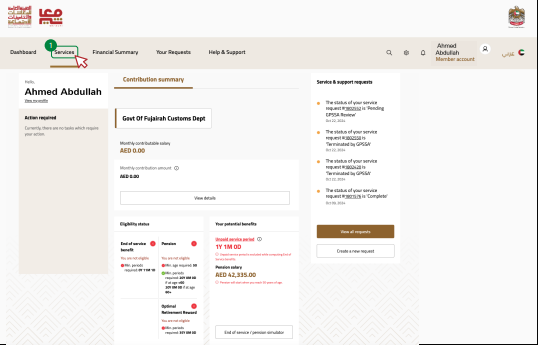
Click on “Services” from the ribbon at the top of the portal
Step 2
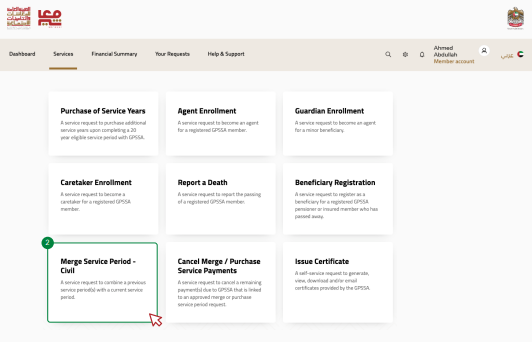
Click on the “Merge Service Period - Civil” tile from the services to choose from.
Step 3
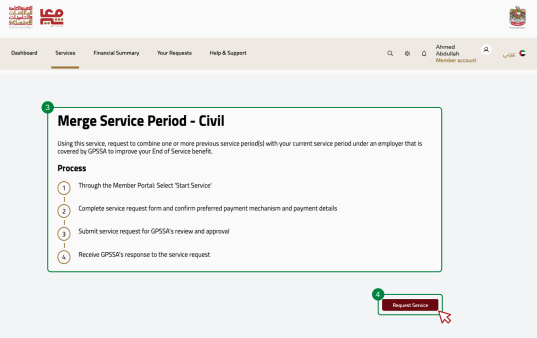
Review the definition of “Merge Service Period - Civil” well as the process and pre-requisites that is required.
Step 4
Then click on “Request Service” to initiate the assessment with GPSSA.
Step 5
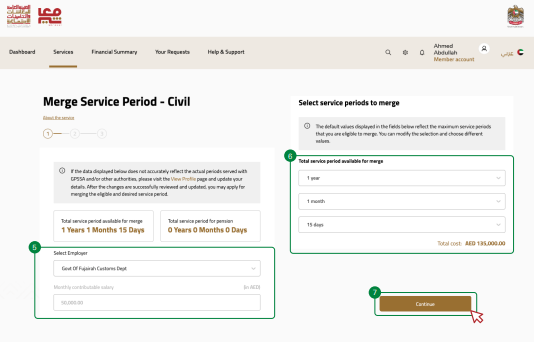
Select your employer from the drop-down list and review the monthly contribution salary that is reflected on the portal.
Step 6
Indicate the service period you would like to merge.
Step 7
Click on ‘Continue’ to proceed to the next step of the process which will request you to confirm how you would prefer to pay the cost to merge a service period
Step 8
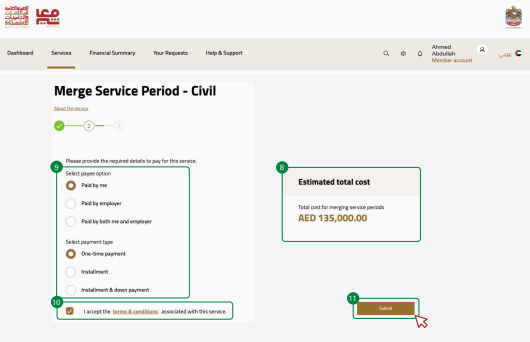
Review the estimate cost to merge a service period.
Step 9
Select the party(ies) that will pay the cost to merge a service period and the payment type.
Step 10
Click on “I accept the terms and condition” associated with this service.
Step 11
Click on ‘Submit’ to finalize the service request.
Please Note:
The Monthly installments amount shall be one quarter of the contribution salary at least. The duration of the installments shall not exceed 4 years or the age of sixty of the insured whichever comes first.
Step 12
Select how you would like to settle the cost associated with the merge service period request.
Step 13
Click on ‘Submit’ to proceed with the payment.
