Unified UAE Legislation Database
Checked by realLaw AI
GPSSA User Guide - Generate Certificates
Status
In force
Issuing Authority
The General Pension and Social Security Authority
This service enables the customer to obtain accredited certificates from GPSSA.
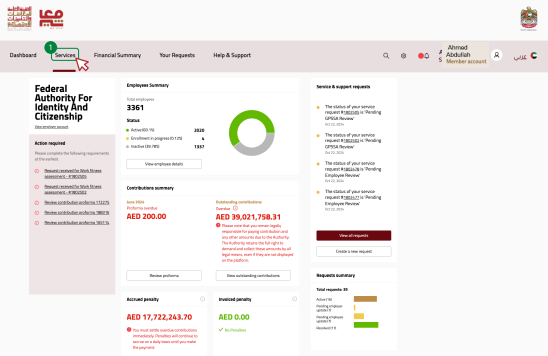
Step 1
Select “Services” from the ribbon at the top of the portal.
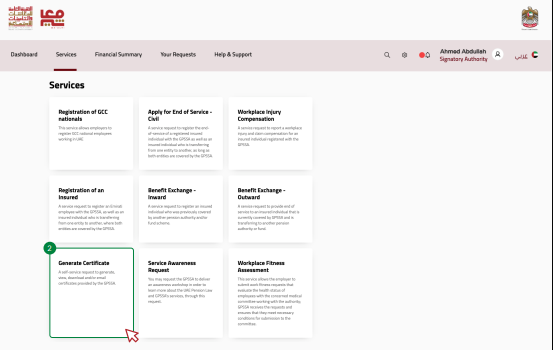
Step 2
Select the “Generate Certificate” tile to find out more about this service, and to initiate a service request to view, download or email a certificate offered by GPSSA
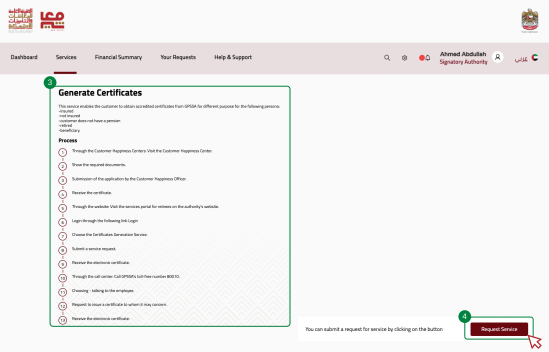
Step 3
Review information to find out more about the service.
Step 4
Click on “Request Service” to initiate a request to generate a certificate.
Step 5
Select the certificate you would like to view, download or email from the drop-down list, and indicate if you would like any data fields to be hidden in the certificate that is set to be generated.