GPSSA User Guide - Employer Deregistration
Status
Issuing Authority
A service request to de-register and/or remove an employer/entity from GPSSA's register.
Step 1
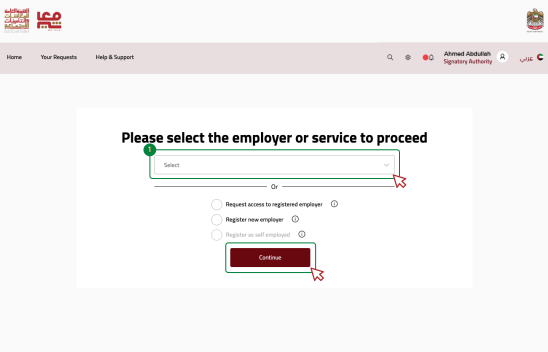
Select your employer from the drop-down list.
Click on “Continue”
Step 2
Enter the one-time-password (OTP) that is sent to your registered email address.
Then click on “Confirm OTP

Step 3
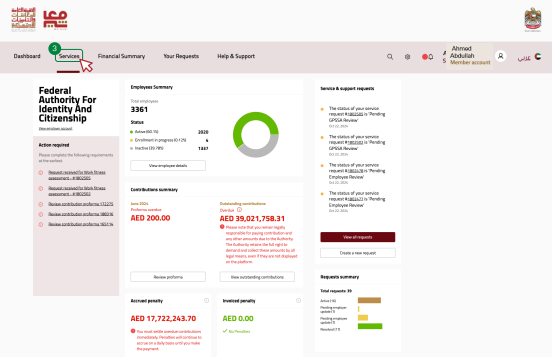
Click on “Services” from the ribbon at the top of the portal.
Step 4
Click on the Employer Deregistration” tile from the services to choose from.

Step 5
Review the definition of Employer Deregistration, as well as the process and pre-requisites that is required.
Step 6
Then click on “Request Service” to initiate the assessment with GPSSA.

Step 7
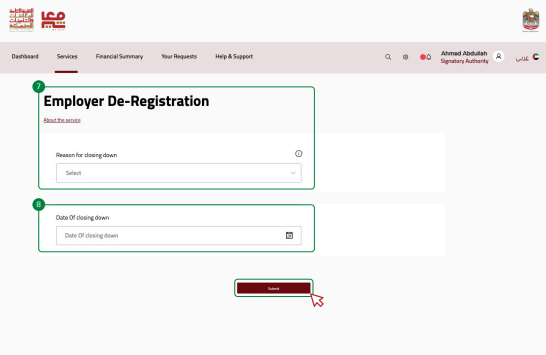
Select the employer’s reason for closing down.
Step 8
After selecting the reason, provide the dates for the closure
Then click on “Submit”.
Step 9
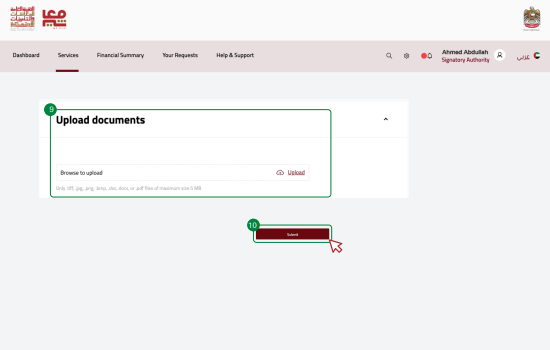
Upload mandatory and any supporting documents.
Step 10
Then click on “Submit” to procgress the Employer Deregistration Service Request.
Step 11
Read and accept...