GPSSA User Guide - Apply for End of Service - Civil
Status
Issuing Authority
A service request to register the end-of-service of a registered insured individual with the GPSSA as well as an insured individual who is transferring from one entity to another, as long as both entities are covered by the GPSSA.
Step 1
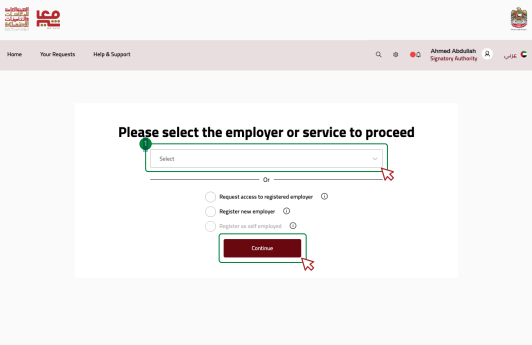
Select Your Employer from the Drop-down List.
Then click on “Continue”
Please Note:
If an individual is not yet linked/ associated with an employer, the drop-down list will appear blank and an individual should complete the ‘Request access to registered employer’ process to gain access and avail GPSSA’s services on behalf of an employer.
Step 2
Enter the one-time password sent to your registered email address.
Click on “Confirm OTP”

Step 3
Select “Services” from the ribbon at the top of the portal.

Step 4
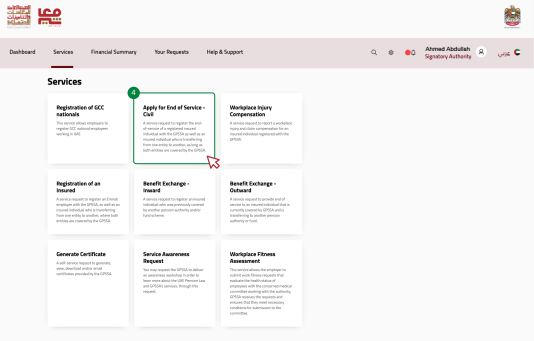
Select the “Apply for End of Service - Civil” service.
Step 5
Review the definition of End of Service – Civil, and the steps that will need to be taken to place the service request with GPSSA
Step 6
Click on “Request Service” to initiate a request to register an insured individual with GPSSA.

Step 7
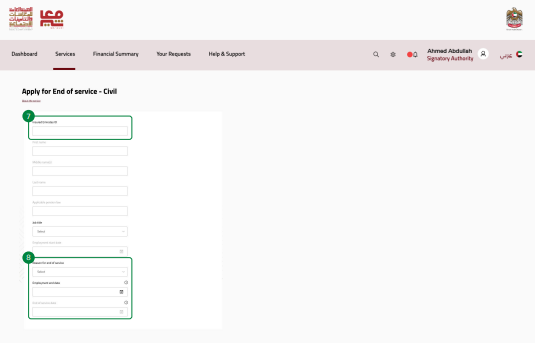
Enter the insured individual’s Emirates ID number and validate the remaining data that will appear once the Emirates ID has been entered into the portal.
Step 8
Indicate the reason that an End of Service, service request is being submitted from the drop-down list, and enter the insured individual’s employment end date (i.e., last working day with the current employer).
Step 9
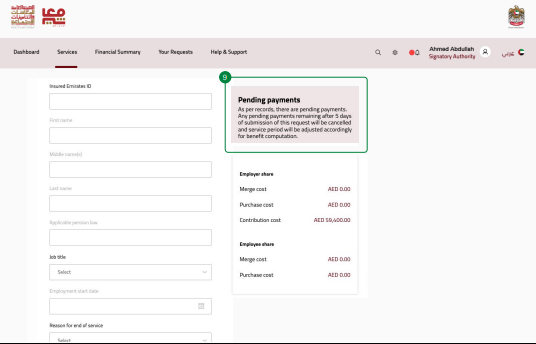
If applicable, receive a notification informing you that there are pending payments which could impact an insured individual’s service period.
Step 10
Review the number of days that will be excluded from an insured individual’s employment period due to unpaid contributions as a result of leave or non-payment.
Step 11
Indicate if the insured individual has any other outstanding financial liability(ies) and enter the required details.
Step 12
Enter the insured individual’s IBAN number – the same as that to which the individual’s salary is credited to.

Step 13
Upload mandatory and any supporting documents.
Step 14
Click on “Submit” to progress the End of Service, service request.
Please Note:
Documents to be submitted depend...